
To purchase an eBook, go to the Catalog page for the course (links below) and click on an Open eBook button. When the eBook opens, click on the red price tag in the upper left and complete the purchase.
Algebra I | Geometry | Algebra II
Note: Standard eBooks cannot be purchased using a purchase order.
You'll be required to "Sign up" using one of three methods. I strongly recommend that you choose to register for a FlipHTML5 account by entering your email address and password. When you do, you'll have access to all of your purchased books on your FlipHTML5 dashboard. Then, every time you open a book or purchase a new one, be sure to use the FlipHTML5 Sign in option (see below) and not the email verification method.
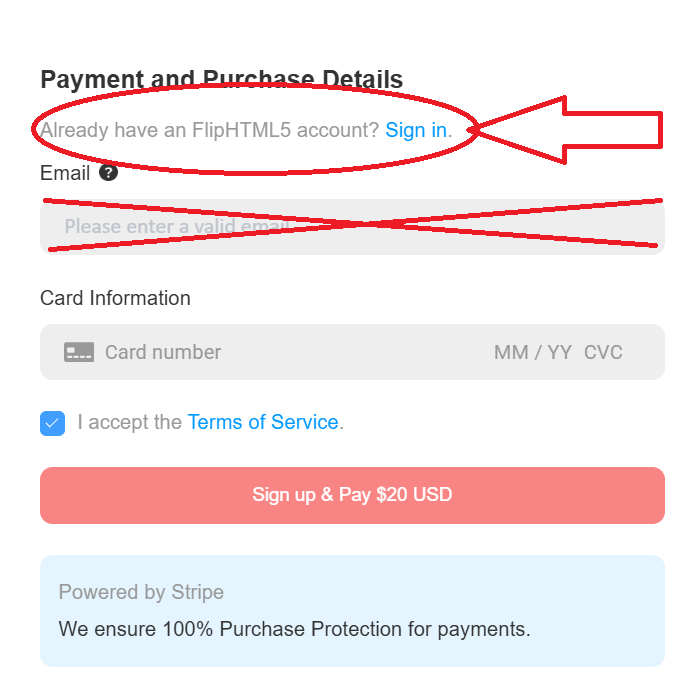
If you choose either of the other methods to sign in -- by an emailed verification code or by your Google of Facebook account -- be sure to bookmark the eBook's URL for later access. Once purchased, return to the bookmarked URL, then use the same method to sign in. Unless you register for a FlipHTML5 account, losing your bookmark may make it difficult to access your eBook later on.
To login to your FlipHTML5 account, go to this page: FlipHTML5 Login
Once logged in, you should find your purchased books here: My Purchases
If you need to reset your password, you can do it here: Reset Password
If you don't receive the reset email, check your spam folder and add accounts@fliphtml5.com to your verified senders list.
For additional help with accessing your eBook, please reach out to FlipHTML5 Support.
Your purchase gives you lifetime access to the eBook. You'll be able to read the entire book, but print functions for Standard eBooks are disabled (except for Answer Keys). If you're a teacher, your purchase grants you permission to display (only) any pages of the books to your students, either in a physical or virtual classroom setting, but does NOT allow you to create paper or digital copies to be shared with or downloaded by students.
If you're looking to print or share copies of pages with your students, consider purchasing a Site License instead. And if you purchase a minumum number of paperbacks based on your school's enrollment, you can get the Site License for free! See the Site Licenses Page for details.
| Rights Granted | Standard eBook | Site License |
|---|---|---|
| Display Content | ||
| Distribute Paper Copies | ||
| Digitally Share Content |